A UV Guide for Python Developers and Beginners:
Also published on Medium.
In this article I’ll cover what UV is, why it’s preferred, and where it can be used. I’ll start with what a package and dependency manager is, what it’s for, and a short analysis of the existing ones. I believe this will be especially useful for developers who want to manage dependencies and set up environments quickly and reliably in their Python projects.
What Is UV and Where Did It Come From?
uv is a tool chain built by Astral. We can describe it not just as a package manager but as a project manager that bundles almost every tool you need. It’s also open source and free.
This new-generation tool chain aims to manage a Python project’s dependencies, create virtual environments, and package the project — fast and deterministically.
Being written in Rust is the main factor behind its performance gains; Rust, as a modern systems programming language, combines the comfort of a high-level language with low-level control and performance. This lets it carry out dependency management and project operations much faster and more efficiently.
What Is a Package and Dependency Manager?
Package and dependency managers are tools used to install, update, remove, and manage libraries and dependencies within an ecosystem.
The well-known package and dependency managers in the Python ecosystem are:
Pip
- Python’s default package manager.
- Its core job is installing and managing packages.
- Virtual environment (venv) setup has to be done manually.
- Uses PyPI as its package source.
- Has no built-in lock file support; this can be added via extra tools like pip-tools.
- Has cross-platform support, but that doesn’t resolve the OS-level dependencies of PyPI libraries.
- Can be slow (limited dependency resolution).
- Resolving version conflicts when updating packages is left to the user.
- Doesn’t offer a direct tool for project packaging (setup, publish).
Conda
- Can manage both Python and system libraries.
- Virtualization is done via
conda env. - Package sources: PyPI, Conda Forge.
- Package definitions use
environment.yml. - Fully deterministic environments are supported via conda-lock.
- Offers cross-platform support.
- Widely used in the data science / ML world because it ships pre-compiled binary versions of libraries like NumPy, SciPy, and TensorFlow.
- Can also easily manage non-Python dependencies (C, Fortran, R, CUDA, etc.).
- Runs heavier — downloads and resolution are slower than pip/uv.
Poetry
- A modern dependency management tool.
- Simplifies project configuration through a TOML file.
- Offers deterministic dependency management via
poetry.lock. - Creates a virtual environment on its own.
- Supports packaging and publishing in an integrated way.
- Dependency resolution is deterministic and reliable.
- Its CLI covers project scaffolding, adding/removing dependencies, and publishing packages.
- Not as widespread as pip or conda, and adoption on the enterprise side is more recent.
So why was a tool like UV needed in the first place?
The Problems UV Solves
Pip and Poetry are enough for many projects, but they can fall short on larger ones. This is where uv comes in, reflecting a single-tool philosophy that gathers the strengths of earlier package and dependency managers and builds on top of them.
- Speed: Being written in Rust, uv gives a serious performance edge over package and dependency managers written in Python.
- Deterministic dependencies: Thanks to the
uv.lockfile, every environment runs with the exact same package versions. - System independence: It significantly reduces the incompatibility problems seen across different operating systems by downloading and using pre-built (python-build-standalone) Python distributions.
- Offline installs and new project dependencies: Thanks to caching, packages can be installed without a network connection.
If we sum up UV in a single sentence, it would be: “Fast, modern, multi-purpose, and deterministic.”
Where Does the Speed Difference Show Up?
Looking at benchmark data, uv shows a serious edge over pip in certain operations — in cold-start scenarios, package installs are about 1.5x faster, and with the cache in place it can be far faster still.
In warm-cache scenarios, based on the graph in uv’s own documentation, installing the trio package’s dependencies takes 4.63s with pip versus 0.06s with uv.
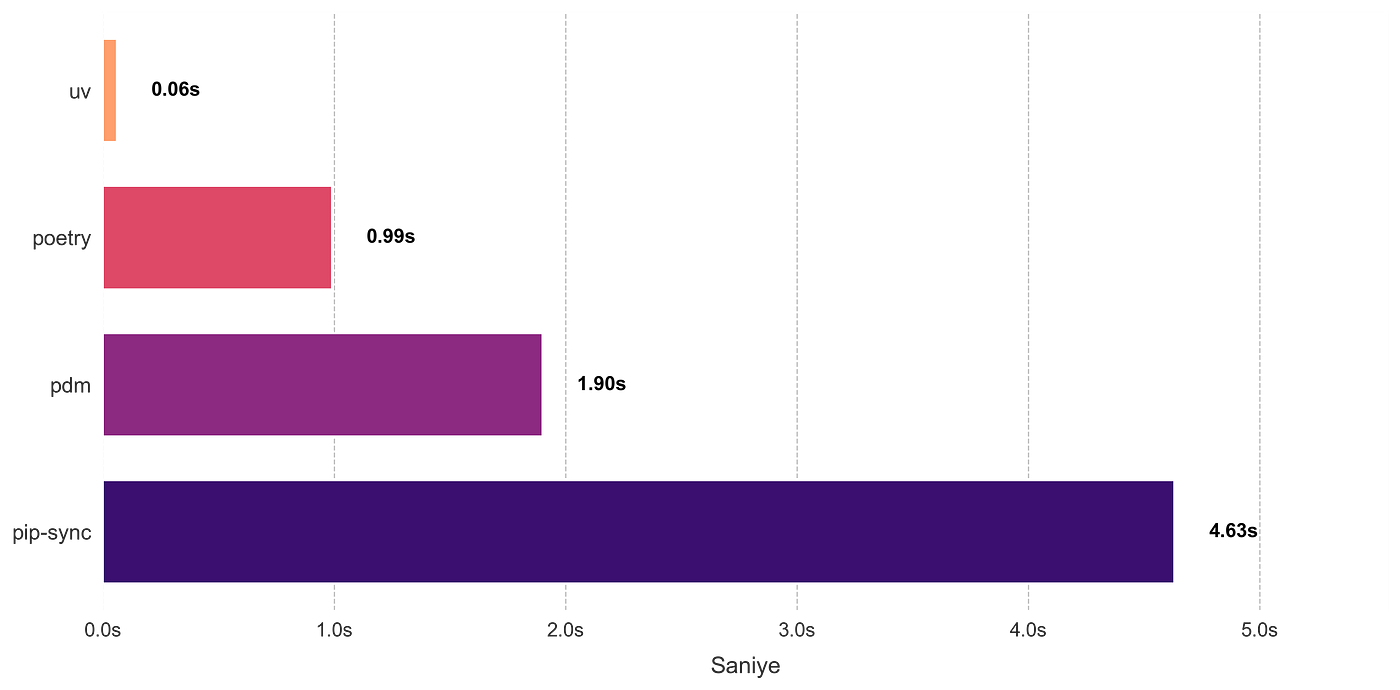
Where the speed difference shows up:
- Package installation and packaging
- Dependency resolution
- Preparing the Python environment
- Multi-stage builds and cache optimizations in Docker and CI environments
So How Does UV Pull This Off?
The answer lies in its cache structure, its lock file, and its bytecode pre-compilation approach.
Parallel installs: UV resolves and downloads dependencies in parallel, which speeds things up especially in projects with a large number of dependencies.
Cache structure: Every downloaded package and resolved dependency is cached. On the first install, the package is downloaded; on later installs, it’s read from the cache instead of being downloaded again. Thanks to the lock file, packages that match the cache are used directly. It can also share the cache across multiple projects, so the same package doesn’t need to be downloaded more than once.
- Fast, network-independent installs
- An overall speed boost
Bytecode pre-compilation: Normally, .py files are converted to bytecode (.pyc) the first time they run, and run from there. uv can optionally do this conversion during package install, so there’s no need to recompile at runtime. This behavior is off by default and is enabled with the --compile-bytecode flag or the UV_COMPILE_BYTECODE=1 environment variable.
- Shorter startup time
- Eliminates the initial-launch delay large projects experience because of dozens of
.pyfiles
Extra Conveniences UV Provides
The first thing that stands out is that it brings many capabilities together in one tool. uv gathers the strengths of the package and dependency managers that came before it and improves on their gaps. On top of that, installing its own standalone versions independent of the system or pyenv lets us get rid of version incompatibilities across operating systems, platform-specific dependency versions, and the lack of environment management tools. That said, this doesn’t mean uv can’t work with the system Python — the system Python is still usable.
Thanks to the lock file, the “works on my machine” problem also goes away. Memory usage is low, thanks to it being Rust-based. Looking at general user feedback, I’ve gotten the impression that uv is quite good at error resolution — meaning you’re spared from drowning in endless stack traces. Its CLI is also simpler and more pleasant to use compared to other package and dependency managers.
UV’s Limitations
Naturally, there are still areas around uv that haven’t fully matured, along with some limitations.
Issues with older projects: uv downloads and serves standalone Python versions, which introduces a constraint on which Python versions can be used. This can be an obstacle for older, large projects that need a fixed Python version. uv can also work with externally installed Python versions, but compatibility issues can arise there too.
Disk space uv takes up: Because of its cache structure, uv uses disk space that grows over time. This cache can be cleared easily via the CLI, but doing so gives up some of the advantages the cache provides. Compared to working directly with venv, we can say that the cache uv builds up takes up relatively less space than all the virtual environments accumulating on our machine, and stays tidier.
Installing UV
First, we need to install uv on the current operating system.
Installing on Windows: You can install it via PowerShell with the script below:
irm https://astral.sh/uv/install.ps1 | iexIt can also be installed with Winget:
winget install --id=astral-sh.uv -eIf you use Chocolatey:
choco install uvIf you use Scoop:
scoop install uvInstalling on macOS:
brew install uvInstalling on Linux: Depending on your distribution, you can install it via DNF.
Fedora:
sudo dnf install uvSnap:
sudo snap install astral-uvOr install it directly via Astral:
curl -LsSf https://astral.sh/uv/install.sh | shIf your system doesn’t allow curl, you can use wget:
wget -qO- https://astral.sh/uv/install.sh | shUsing UV via Its Core CLI Commands
Let’s first look at creating a project with uv. In the directory of your choice:
uv init <project-name>Running this command creates the basic components a project needs. We covered the resulting files in earlier sections, but it’s worth defining them here as well, as they appear when a project is started with uv:
.gitignore: Tells Git which files or folders it shouldn’t track. (Yes, when you start a project with uv, a git environment comes ready out of the box.) If you want to start the project without git:uv init --no-gituv.lock: The lock file records a project’s dependencies with their exact versions. So when the project is moved to another machine or opened by another developer, exactly the same package versions get installed.pyproject.toml: TOML is a format used to define configuration files in a way that’s readable and writable by humans.
[project]
name = "project"
version = "0.1.0"
description = "Add your description here"
readme = "README.md"
requires-python = ">=3.12"
dependencies = [ ]README.md: A.mdMarkdown file describing the project.main.py: A.pyfile placed there as a starting point..python-version: The file that holds the Python version.
Managing Python Versions
uv can manage not just packages but Python versions themselves. This means you no longer need a separate tool like pyenv.
uv python install 3.12
uv python list
uv python install lets you download and install the Python version you want, and uv python list shows the versions available on your system and the ones that can be installed.
Adding and removing a library from the project:
uv add <library-name>
uv remove <library-name>
Creating a build:
uv buildRunning the project:
uv run <python_file.py>Running tools on the fly (uvx): When you want to run a tool once without adding it as a permanent dependency to the project, uvx (short for uv tool run) comes into play. It’s uv’s equivalent of what pipx does. For example, to run ruff without polluting your environment:
uvx ruff checkuv downloads and runs the tool in a temporary, isolated environment; once you’re done, nothing is left behind. If you want to install a tool you use often permanently and system-wide, you can use the uv tool install <tool-name> command.
pip-compatible interface (uv pip): If you already have a project that works with pip, or you don’t want to move to uv’s project structure just yet, uv has an interface that mimics the familiar pip commands:
uv pip install <library-name>
uv pip freeze
This lets you ease into the migration without breaking your existing habits, while still benefiting from uv’s speed.
Syncing between pyproject.toml and uv.lock: uv actually does this itself during package installs, but when dependencies are added manually or pyproject.toml is changed, the sync command updates the lock file.
uv syncThis command syncs the toml and lock files.
Conclusion
As the overall review shows, uv is an extremely useful tool chain thanks to its strengths and the fact that it bundles the tools you need. It could spread quickly in education and individual use. Going forward, I expect uv’s IDE integrations to mature even further; even now it works smoothly in environments like VS Code and PyCharm once the created venv is pointed to. If Astral keeps UV open source and keeps developing it, I think we’ll see it become even more widely used.